P.A.R.T.S™

Photographic Area Rug Tracking System

Never lose a rug again.

P.A.R.T.S is rug tracking software for cleaning plants. Photograph every rug at collection, tick it through your own wash stages, and prove what condition it arrived in, from a phone, on the floor, with wet hands.

Built and used daily in a working South African rug cleaning plant.

A rug's journey, as your plant already runs it

  • Received
  • Dusting
  • Washing
  • Rinsing
  • Spinning
  • Drying
  • Grooming
  • Inspection
  • Ready for delivery

These are the default stages. Rename them, reorder them, recolour them, retire the ones you do not do. It should read like your plant, not like software. The last one is not a tick box: it is a quality check with a photograph.

The method

How to track rugs in a cleaning plant

Rugs get lost in plants for one reason: once a rug is off the van and on the floor, nothing about it says whose it is. Tracking rugs means giving every rug an identity at the moment it leaves the client's house, and recording every time it moves. Six steps, and none of them need a barcode.

1

Photograph the rug at pickup

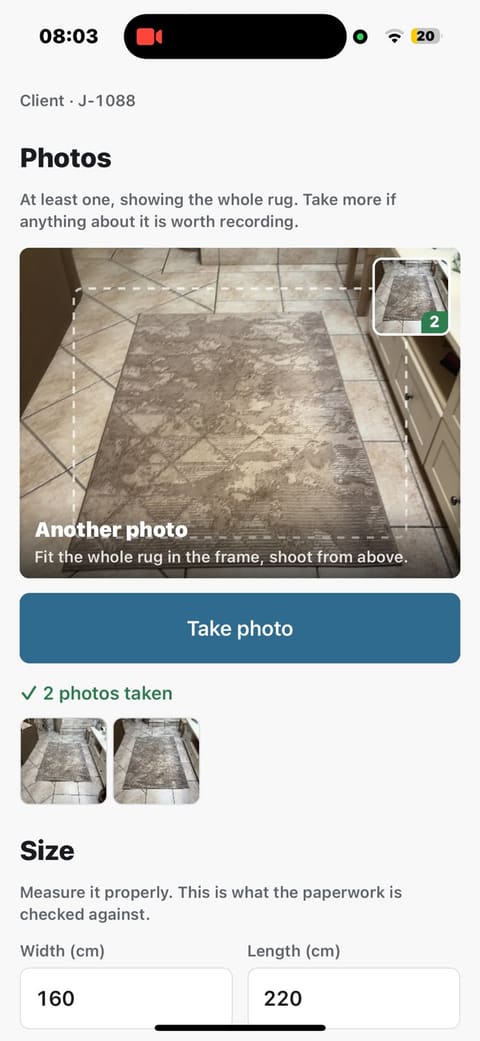
The photograph is the identity. A number written on a job card tells you nothing when you are standing in front of forty rolled rugs; a picture tells you immediately. Take it in the lounge, before the rug is rolled. The date and time are printed into the picture itself, so they travel with it.

The photo step on a phone: a viewfinder framing a grey patterned rug on a tiled floor, a Take photo button, and a green tick reading '2 photos taken' above thumbnails of both shots.
2

Fill in all the details

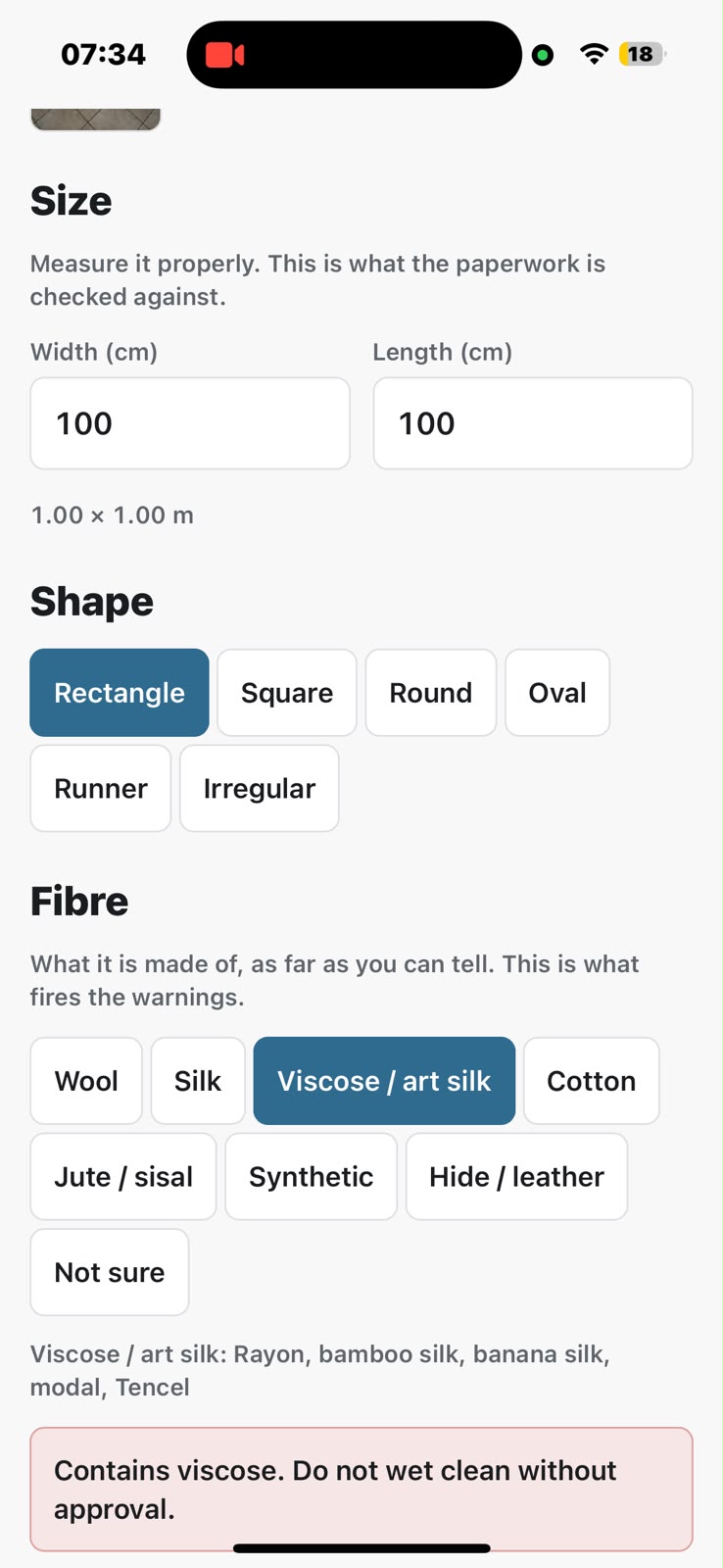
Size, shape, what it is made of and its colours, on one screen, in under a minute. Tap a risky fibre, or a colour that bleeds, and the warning appears there and then. The job number comes with it: one job card per collection, numbered J-1042, with each rug on it numbered J-1042-03, so the paperwork and the rug agree from the start. You do not need tags. If your plant already tags its rugs, type the tag number in and the rug is tracked by it as well.

The details step being filled in: width and length in centimetres, Rectangle selected under Shape, and Viscose / art silk selected under Fibre, with a red panel warning 'Contains viscose. Do not wet clean without approval.'
3

Photograph any existing damage

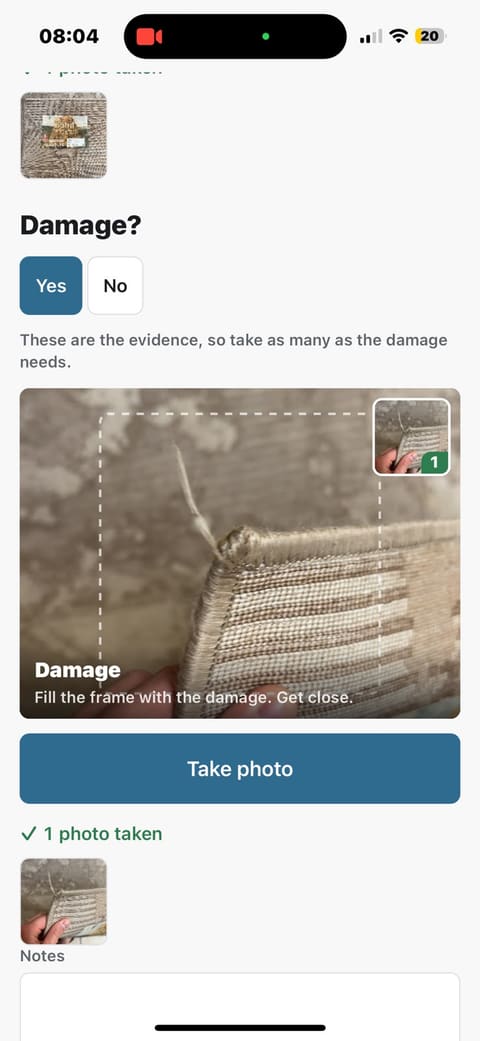
Every mark, tear, stain and worn fringe that is already there, with one-tap buttons for the usual ones (pet urine, moth, dye bleed, previous repairs) so nobody types with one hand. This is the record you produce when somebody says the fringe was fine when they gave it to you.

The damage step: a thumbnail of the care label already photographed, a Damage? Yes/No choice with Yes selected, and a viewfinder filled with a frayed corner of the rug where the fringe has pulled away.
4

Tick the rug through each stage as it moves through your specific process

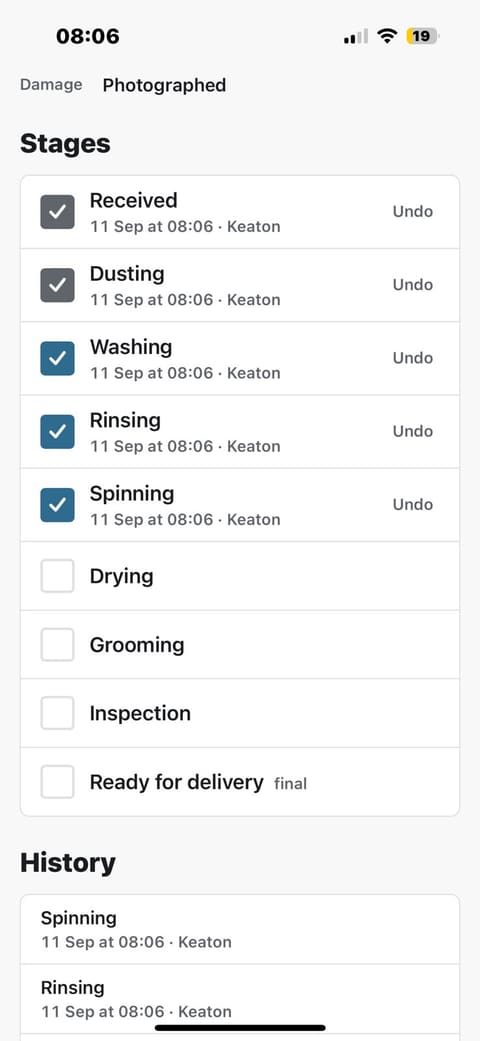
Received, dusting, washing, drying: your stages, named the way your plant names them. One tap per rug, stamped with the time and the operator's name, and an Undo beside every tick that is itself recorded. The stage is the answer to "where is my rug?". A plant whose stages are places does not need a second list of shelf numbers going stale.

A rug's stage list: Received, Dusting, Washing, Rinsing and Spinning ticked, each stamped '11 Sep at 08:06 · Keaton' with an Undo beside it, Drying, Grooming, Inspection and Ready for delivery still open, and the history below.
5

Sign it off with a photograph and your own checks

The last stage is a quality check, not a tick box. Photograph the finished rug, answer your plant's own checks (clean edge to edge, dry to the backing, fringes finished) Yes or No, and press one button. It reads Passed or Send back to Washing, depending on the answers. A failed rug goes back to the right stage on its own, and the failure stays in its history.

6

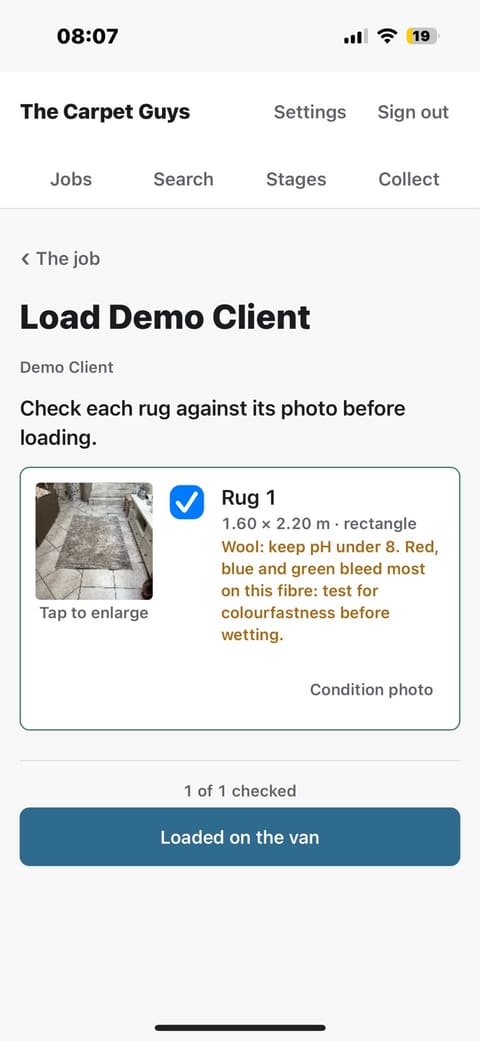
Check each rug against its photograph before it loads

Only a job whose rugs have all passed can go on the van. At the van, compare the rug in your hands to the picture taken at collection. This is the last moment a mix-up is cheap to fix, and it is the step that stops Mrs Naidoo receiving Mr Botha's rug. Delivered is a separate tap at the door.

The load checklist, headed 'Check each rug against its photo before loading': the rug's thumbnail beside a ticked blue checkbox, its size, shape and fibre warning, '1 of 1 checked', and a Loaded on the van button.

On the floor

What your staff actually see

Photographed on a phone, in a working plant, on real jobs. There is no menu bar to learn: the home screen is one search box over the open jobs, oldest first, and every other screen has a single link back to it.

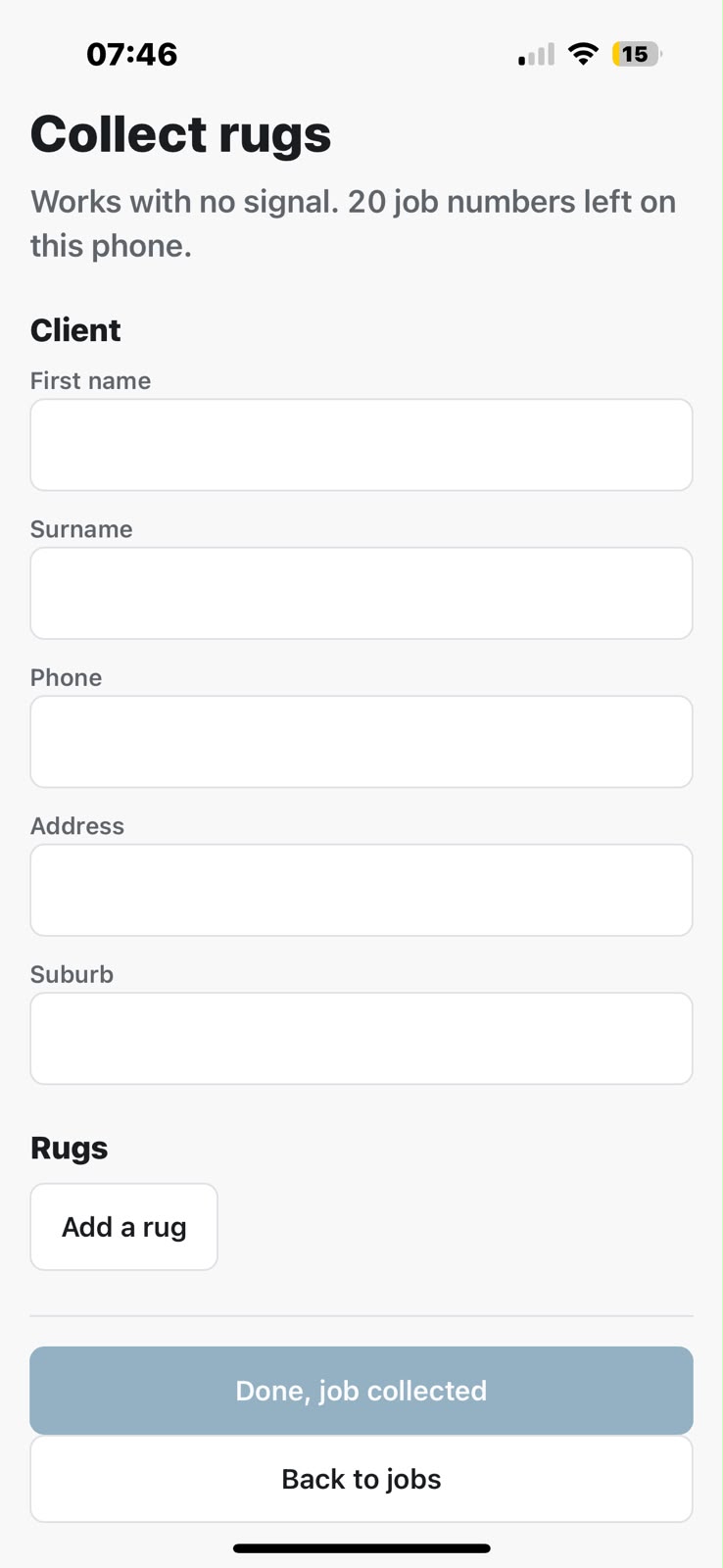
The collect screen, headed 'Works with no signal. 20 job numbers left on this phone', with the client's name, phone and address and an Add a rug button.
Collecting, with no signal The screen your driver uses in somebody's lounge. It shows how many job numbers the phone is still holding, so a whole round can be booked in with no reception at all, and anything not yet sent says so on every screen.

When the job is done

The delivered report: your record, for as long as you want it

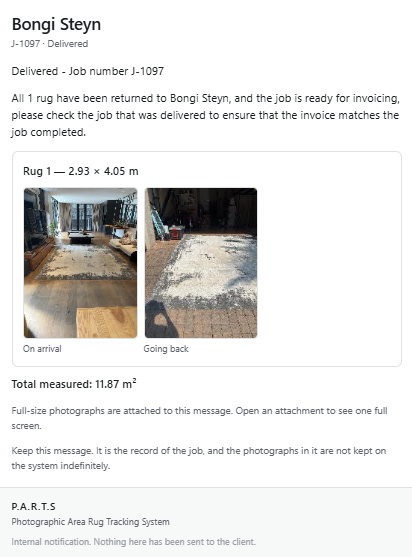
The moment a job is marked delivered, the office gets one email that closes it out. Each rug has its own card, showing the photograph taken on arrival, any damage photographed at collection, and the photograph taken on the way back. Under them are its size, its fibres, any damage noted at collection, and the job's total area, ready to invoice from. Re-cleans are marked do not invoice and left out of the total.

  • The photographs are kept for as long as you keep the email. The system deletes its own copies thirty days after delivery, so it never becomes a storage bill. The report attaches the full-size photographs, with the date and time printed into them, so the evidence stays in your inbox after that. File the email and you still have it years later.
  • Before and after, side by side. When a client says the rug went back worse than it came in, the answer is one email, not a search.
  • Your wording, sent to your staff only. You choose who receives it and what it says. Nothing is ever sent to the client.
A delivered report email for job J-1097: 'All 1 rug have been returned', a card for Rug 1 at 2.93 × 4.05 m with an 'On arrival' photograph beside a 'Going back' photograph, the total measured area of 11.87 m², and a note that the full-size photographs are attached and the email is the record of the job.
A real delivered report, as the office receives it.

What it does

One job, done properly

If a feature needed a subsystem to explain it, it is not in here.

Intake

Every rug has a photograph and a number

Booked in at the client, on a phone, in under a minute. The number goes on the job card; the picture is how anyone recognises it later.

On the floor

You always know what stage it is at

Your own process, your own stage names. One tap per rug, timestamped, with the operator's name on it. "Where is Mrs Naidoo's rug?" takes one search.

Evidence

Damage disputes end quickly

Condition photographs from the day of collection, with the date and time printed into them, and a record of who did what to the rug and when. Save or share any photograph straight from the rug to WhatsApp or email. One argument settled pays for a year of this.

Prevention

It warns your team before the wash bath

Tap "viscose" at intake, or a black or red on a wool rug, and the warning appears immediately, and again on every stage screen for that rug. It is the mistakes that never happen that you never hear about.

Quality

Nothing leaves without passing your checks

A photograph of the finished rug and your plant's own checklist, answered Yes or No. A fail sends the rug back to the stage that fixes it, and nothing goes on the van until every rug on the job has passed.

The office

The office hears when a job is ready

One email to your own staff when the last rug on a job passes, and one when it is delivered, with every rug's size and the job's total area for invoicing. Re-cleans are marked "do not invoice". You choose which mails go and what they say.

The rug itself

Tags if you want them, never because you have to

A rug is identified by its photograph and the number on the job card, so nothing has to be stapled, pinned or sewn to it. If your plant already tags rugs, switch tags on: the tag number sits on the rug's record beside its damage photographs and is found from the search box while the rug is in the building. It stays internal: no report or email shows it.

In the van

It works with no signal

Collect rugs at a client with no reception at all: photographs, sizes, damage notes, the lot. It holds them on the phone, says plainly that nothing has been sent yet, and sends when you are back in range.

Storage

It never turns into a bill

Photographs are compressed when a job is delivered and deleted thirty days later. The written record (client, size, damage, who did what) is kept for good, and the delivered report keeps the photographs in your own inbox for as long as you want them.

Deliberately absent

What it is not

Half of what makes this fast on a plant floor is what was left out.

  • Not an invoicing or accounting package. It tracks rugs and hands the office the sizes. Your books and your prices stay where they are.
  • No barcodes, QR codes or scanners to buy, lose, reprint or pick out of a wash bath. Tags are optional: keep using your own, or go without.
  • No app store. It installs to the home screen from a web address, on any phone your staff already own.
  • No client portal and no automatic emails to your customers. The only mails go to your own staff. The office phones clients, the way it already does.

Ownership

Your data is yours

  • Every plant gets its own separate database. Nobody shares a table with anybody, and there is no shared pool of your clients' details.
  • Backed up nightly, automatically, and you can have a full export of everything whenever you ask for it.
  • If you leave, you take it with you. That is the deal, and it is why people trust it.

Privacy

Built for POPIA and GDPR

Your clients' names, phone numbers, addresses and photographs of their homes are personal information. P.A.R.T.S is designed to hold as little of it as the job needs, for no longer than it is useful, and to show nobody who should not see it.

  • Only what the job needs. A client is a name, a phone number, an email and an address. Nothing else is asked for, and nothing is collected in the background: no tracking, no analytics, no advertising.
  • Photographs are deleted, not stored forever. Photos are compressed when a job is delivered and deleted automatically thirty days later. The retention period is set per plant.
  • Nothing is sent to your clients, and nothing is shared or sold. The only emails go to your own staff. There is no marketing list and no client portal to leak.
  • Private by default. Photos are kept in private storage, and each photo link works for five minutes only. Everything travels over an encrypted connection. Passwords are stored with Argon2id, and repeated wrong guesses are blocked.
  • Every action has a name on it. Every staff member has their own login, and every stage tick and change is recorded against the person who made it.
  • Your plant, your data. Your plant has its own database, shared with no other plant. Your data is exported whenever you ask, so you can answer a client who wants to know what you hold about them.

Price

One number, whatever your volume

The same price whether you do ten rugs a day or a hundred.

R2 100 US$129 · £99 once, to set you up and train your team
R485 US$30 · £24 per month, everything included
  • Every member of staff, at no extra cost Operators, drivers and office all get their own login, so every tick carries the name of whoever did it. There is no per-user charge and no seat to buy.
  • On as many phones as you like It installs to the home screen from a web address, on whatever your staff already carry. No app store, no devices to buy, nothing to reinstall when somebody changes phone.
  • Your own web address Your plant gets its own, like yourplant.p-a-r-t-s.co.za, with its own certificate. That is also what lets the camera, the home-screen install and the offline collection screen work at all.
  • Set up in your plant's name and colours Your stages and stage names, your staff, your rug colours and your company name, configured before you start, not left for you to work out.
  • Photograph storage included Compressed when a job is delivered and deleted thirty days later, so the pictures never turn into a storage bill that grows every month. The delivered report keeps a full-size copy in your own inbox.
  • Every update, at no extra cost The system is still being improved, and your plant is on the newest version the day it lands, the same one every other plant runs. Improvements arrive on your address on their own: nothing to upgrade, nothing to reinstall, and no charge for the next one.

No per-rug charges, no tiers, and no annual contract.

Straight answers

Questions rug cleaners ask

What is the best way to keep track of rugs in a cleaning plant?

Photograph each rug at collection, give it a job number written on the paper job card, and record every stage it passes through. The photograph identifies the rug when nothing else can, the number ties it to the client's paperwork, and the stage history answers where it is and what has been done to it.

Physical tags are the common alternative, and on their own they fail in predictable ways: they come off in the wash, they get reprinted wrong, and a rug with no tag is a rug with no identity. If your plant tags anyway, P.A.R.T.S tracks the tag alongside the photograph, so a lost tag never means a lost rug.

Do you need barcodes or RFID tags to track rugs?

No. Barcodes and RFID assume you can attach something to the item and that it survives the process. Rugs go through dusting, immersion, spinning and drying, and anything attached either comes off or has to be removed and reattached at every step.

It also means nothing is stapled, pinned, taped or sewn to a rug to keep track of it. Those leave holes, rust marks and torn fringes: damage done by the very thing that was meant to protect you from a damage claim.

A photograph taken at collection, a number on the job card, and a person comparing the two is the mechanism most plants already use informally. P.A.R.T.S makes it reliable rather than replacing it.

A plant doing enough volume to tag every rug can still do so. Type the tag number in at collection and it is tracked with the rug's damage photographs and found from the search box while the rug is in the building. Tags are reused once a rug goes home, so search only ever finds the rug carrying that number now.

How do you prove a rug was already damaged when it arrived?

Photograph the damage at the client's house, before the rug is rolled or loaded, and record a written note beside it. A dated photograph taken at collection, together with a stage history showing who handled the rug and when, settles almost every dispute in one conversation.

In P.A.R.T.S the date and time are printed into every photograph, so the picture you send a client carries its own proof of when it was taken. Any photograph can be saved or shared from the rug card. The system keeps them while the job is open and for thirty days after delivery. The delivered report emailed to the office attaches them at full size, so they stay on file for as long as you keep that email. The written damage notes are kept permanently.

How do rug cleaners avoid mixing up customers' rugs?

By checking each rug against its collection photograph at the moment it is loaded for delivery. Mix-ups almost never happen on the plant floor. They happen at the van, when similar rugs from different jobs are being loaded at the same time.

P.A.R.T.S puts a checklist at exactly that moment: each rug on the job with its photograph and dimensions, ticked off as it goes onto the van. The job cannot be marked delivered until it has been through that step.

How do you check a rug is finished before it goes back?

With a short quality check at the end of the process: photograph the finished rug, then answer a handful of questions (clean edge to edge, dry to the backing, fringes and pile finished, smells clean, damage notes still accurate) Yes or No. Keep the list short. A checklist of fifteen gets tapped through without being read.

In P.A.R.T.S the checks are your plant's own, edited in settings, and each one names the stage a failure sends the rug back to. A rug that fails goes back automatically, the failure stays in its history, and nothing can be loaded for delivery until every rug on the job has passed.

Which rug fibres need a warning before washing?

Viscose and art silk, jute and sisal, and anything tanned such as hide or leather should not be wet cleaned without a deliberate decision, because they stain, shrink or fall apart. Wool, silk and cotton need care over pH and agitation rather than avoidance. Colour matters too: black, red and blue dyes are the ones most likely to bleed into a pale field, so test for colourfastness first.

P.A.R.T.S asks for the fibre and colours at intake and shows the warning immediately, then again on every stage screen for that rug, so the warning reaches the person at the wash bay rather than staying on a form.

Does it work without an internet connection?

In the van, yes. Collecting rugs at a client and signing off a delivery both work with no signal at all. The phone holds the photographs and details and sends them when it is back in range, showing plainly that nothing has been sent yet.

On the plant floor, no, and deliberately. Stage ticks are never queued: a tick that looks saved but is not is worse than one that visibly failed.

What does rug tracking software cost in South Africa?

P.A.R.T.S is R2 100 once for setup and training, then R485 a month with everything included, with no per-rug charges, no tiers and no annual contract. The price is the same whether the plant does ten rugs a day or a hundred. The system is improved continuously and every update is included, so you are always on the latest version, and a new feature never arrives with a new price.

Is it POPIA and GDPR compliant?

It is built to support both. It collects only what the job needs, deletes photographs thirty days after delivery, never contacts your clients and never shares their details. Each plant has its own database, photos are kept in private storage, and every change is recorded against the person who made it.

Under both laws, compliance is the plant's responsibility, because the plant decides what its clients' information is used for. P.A.R.T.S gives you the tools to meet that responsibility. It does not meet it for you.

How long does it take to book a rug in?

Under a minute per rug on a phone: one photograph, the size, the shape, the fibre, the colours, and whether there is damage. The whole intake is designed around an operator with one free hand, and it is timed with a stopwatch on real hardware rather than estimated.

Next step

Have a look at the real thing.

It is easiest to show you. I run a rug cleaning plant myself and this is what we use every day. I will come to you, show you the real system with real jobs in it, and let your own operators book in a rug and see how long it takes them.